Tonight I thought I’d take time out to review the Gateway TA1 Convertible Tablet PC.
Sitting down to post a review can sometimes be considered a burden rather than a challenge. In order to sit down and review the Gateway Tablet PC I first had to hunt one down. Knowing that Gateway had pulled out of the PC market in Australia meant that I was going to find my first task more challenging that initially thought.
I started by emailing Gateway, and then searching locally, and finally landing on the doorstep of Dr. Neil Roodyn. It seems that on one of his travels Dr. Neil had been given a Gateway tablet PC and had strangely left it to his Girlfriend to use as her desktop – “strangely” mostly because Ive never witnessed a device leave his clasp, even the two PC’s and countless devices I’ve built for Dr. Neil are still housed and used in the same room.
I picked up my 14” widescreen friend, and headed to my den.
The first thing to comprehend about Tablet PC is that they are designed to increase mobility; tablet is meant to replace a traditional paper and pen combination with the new found might of Windows XP Tablet PC edition. As I hoisted the device from the boot of my vehicle, and took the 17 strides required to reach the home-office, I could feel a strange sense of fatigue come over me. As I reached my desk, and made a two handed clutch for Tablet, I realized that I’d spent more energy than usual on this simple journey from garage to office.
If you’re ever able to pickup one of these tablets the first thing that will strike you is the shear weight that is consumed by the 14” widescreen, DVD burner, 3 USB ports, firewire, VGA, card reader, PCMCIA slot and Bluetooth. Obviously I was not impressed but I remained open enough for the beast to tame my sense of mobility; perhaps under the hood the Gateway would befriend me?
As I fired up the machine I was pleasantly surprised to experience a substantially fast boot period. As I hunted for the pen I was greeted by my first bit of Tablet-specific Gateway thinking. The pen, unlike most Tablet PC’s, has been given its own push button release mechanism. Admittedly I was not a fan at first but after having spent the last several weeks with TA1 I came to the conclusion that this bit of Gateway genius would serve purpose on other Tablet PC’s too - you see the push-down and pop-out method adopted by most Tablet PC’s is considered FUNctional, until someone looses an eye that is!
Now with stylus in hand I decided to go for my first inking on this Gateway beast. Using the pen I clicked on “Start”, “All Programs” and then opened “Windows Journal”. All tasks performed very accurately and very responsively. With a new Journal page now staring back at me I made my move towards a blank line. As I approached, with trembling stylus in hand, my deepest fears were realized; not only would the pen not ink, but the entire system decided to think, hunt, process and memorize, all without reason – after all I’d only tried to write my name.
The following evenings were wasted trying to improve my angle of approach, my self control and most importantly my patience. As I planned ways in which my stylus could best talk to the tablet I realized that inking had now become a strategy, and sadly, had left the realm that I once defined as intuitive and instinctual. More and more I reached for the touch pad and left the stylus back in its well designed place holder. The more time I spent with this device I stopped seeing it as a Tablet player, and started to look at it as more of a notebook, with Tablet features. With this paradigm now shifted I gradually gained love back for the Gateway that had so quickly left my body.
Before I allow you to get carried away with my pessimism I have to pass on one very very valuable piece of praise that is well deserved by the Gateway team. It starts and ends with this: Tablet price!
We are probably all aware that Tablet PC carries a premium; some of you may also be aware that Gateway has aggressively challenged the Tablet space by dropping the price of its device when compared to equivalently spec’ed machines. However the one very piece of information that is missing from the equation is “just how did they achieve this”. How has Gateway been able to do this while other vendors insist on commanding nearly double for an equivalent beast?
To properly understand the math you need to know firstly that the Tablet PC premium is mostly eaten up by the magnificently crafted Wacom digitizer board, concealed in a Tablet PC and used to capture all our ink gestures. This board, which carries very few competitors in the market place, very often makes up more than 40% of the production costs of the Tablet PC technology. In the case of the Gateway engineers, they went off and decided to craft a new digitizer technology that would allow them to break into the Tablet PC space with prices previously unattainable by their competition. In turn the Gateway tablet ships not with a Wacom digitizer pack, but instead with a proprietary Gateway solution, designed to cut costs. For this feat I take my propeller hat off to them…well done boys, I love the intention.
What I find hard to believe is that they would go to market with something that works so poorly. If you’re thinking of buying a Gateway Tablet PC then you’ll need to look no further than the Gateway Website to do a little test-driving of your own. Just follow this link and ink with your mouse on the really neat flash intro they have. Of course the mouse will give you a less refined and more jagged writing style, but then again so will the Gateway machine itself. If you find the inking ability of this flash intro acceptable (perhaps left on the Gateway site as a stroke of marketing genius) then read on brother, read on….
If you’re in the market for a Tablet PC I must regrettably inform you that this is not for you. If however, and several of you are, you are in the market for a general purpose, DVD playing, widescreen, Bluetooth enabled notebook and don’t mind paying a small premium for some added Tablet features, then this puppy should be seriously considered.
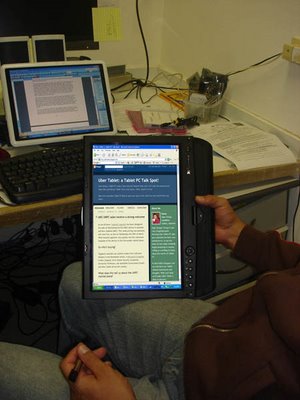
I love that the Gateway convertible connected when I needed to connect (both Bluetooth and WiFi) and gave me unmatched Tablet viewing pleasure via its 14” widescreen technology. I really enjoyed having an optical drive on the Tablet, a now rare occurrence by most vendors, and also enjoyed the jog dials and bush buttons located on the tablet screen.
In conclusion all I can add is this: “If tablet PC were an NGO (Non Governmental Organization), and I were Kofi Annan, then all of my votes would go to supporting the Gateway project called “lets take away the Wacom monopoly and give Tablet PC back to the people.”
Thumbs up, and praise, for developing a really great notebook that ships with Tablet features; thumbs down however for thinking that tablet PC users wouldn’t want a more effective form of inking. Im praying that Gateway Tablet generation 2 or 3 will house a more acceptable inking format, therefore proving that the Tablet PC price point can close the gap on their more traditional notebook cousin.
Next week...Lenovo X41 review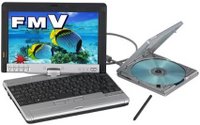 It seems that engadget got Dennis Rice and Warner Crocker talking about a possible Fujitsu "mini tablet" called the Biblo LOOX. If you take into account that James Kendrick pointed to a fantastic Linda Epstein review of the P1510D only days prior then it seems Fujitsu is on everyones lips.